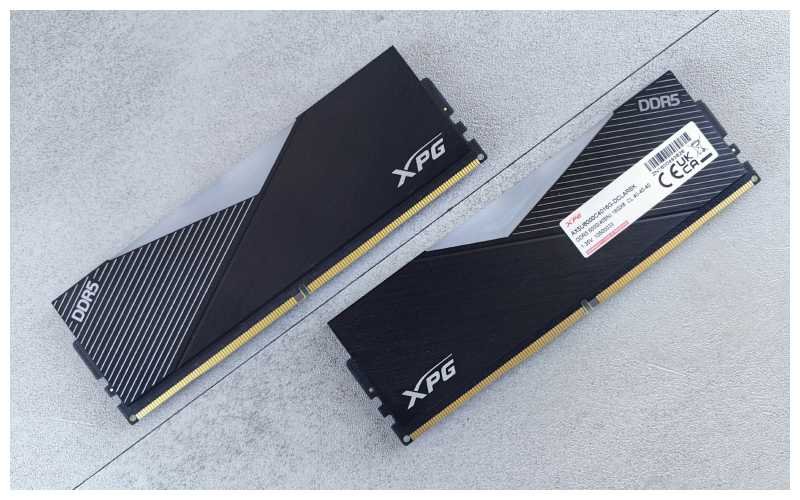
Finding the right RAM doesn’t have to be this difficult, but it almost always ends up that way. You search for 16GB DDR5 RAM and get bombarded by 4800MT/s, 5600MT/s, 6000MT/s, CL36, CL40 and your upgrade ends up being a mini-class on RAM. For the sake of simplicity, here’s a brief summary of why 16GB DDR5 RAM is an excellent choice for a modern computer built for most users. There are just a few items that need consideration before you make your decision.
What Makes 16GB DDR5 RAM Different?
RAM is your system’s short-term working space—the memory your open applications actually use while running. Consider it a desk. A small one means constantly clearing space before bringing something new out. A bigger one lets you keep more going at once. RAM works the same way. DDR5 succeeded DDR4 with higher bandwidth ceilings and some real architectural changes under the hood. One important change is that every DDR5 module is internally split into two independent 32-bit sub-channels instead of one 64-bit channel.
This is a module-level design change, and it’s part of why DDR5 can be more efficient than DDR4 at similar capacities, but it’s separate from the “how many sticks should I buy” question, which I’ll get to below. Newer doesn’t automatically mean faster in your specific build, though. Your CPU, motherboard, GPU, and storage all shape how much of DDR5’s advantage you’ll actually notice. Buying RAM just because the box says “DDR5″ and stopping there isn’t a great strategy—the full spec sheet matters more than the label.” For a deeper technical breakdown, Tom’s Hardware’s DDR5 vs DDR4 guide is a solid reference.
Is 16GB Actually Enough Today?
For the average user, yes. It comfortably handles:
- Web browsing and office work
- Programming and IDE use
- Online classes and streaming
- General multitasking
- Light photo editing
- Most modern games
Where things get tight is when you have multiple things going on at once: a browser with many tabs open, a messaging client, syncing applications, and a couple of applications all at once might add up quicker than people think, especially compared to just a few years ago. When you get into 32GB, this starts to make more sense: video editing, VMs, 3D applications, datasets, or multiple applications running at once. Not because 16GB isn’t enough but rather because 32GB gives more peace of mind, especially if you plan on keeping the machine for a while.
16GB DDR5 RAM for Gaming
16GB still seems like a decent choice to start with in a gaming computer. It needs to be mentioned, however, that increased RAM speed will never resolve the issue of bottlenecking your GPU. If your system is already limited by a CPU or GPU bottleneck, simply increasing RAM speed may not provide a meaningful improvement in FPS. Gaming performance depends on several factors, including the GPU, CPU, RAM, game engine, resolution, and graphics settings. RAM usage while gaming also depends on how many other applications are running alongside the game.
What DDR5 Speed Should You Buy?
While looking for the kit, you will be able to get it at 4800, 5200, 5600, and 6000 MT/s. Since there seems to be some confusion on the matter, it is useful to note down here that all the figures listed are actually transfers per second (MT/s), even though they are sometimes advertised with their clock speeds (which is technically only half of the marketing number). DDR memory transfers data on both the rising and falling edges of the clock, which is why the advertised MT/s figure is twice the actual clock frequency.
| Memory Speed | General Position |
| 4800 MT/s | JEDEC baseline / entry-level DDR5 |
| 5200 MT/s | Mainstream |
| 5600 MT/s | Very good mainstream option |
| 6000 MT/s | Common performance sweet spot |
Platform support is much more important than what number is printed on the box. The officially supported DDR5 speed by Intel depends on which generation of processor it is. Some of the newer Intel platforms have officially supported DDR5 speeds faster than some older platforms.
AMD’s side is a bit different. Processors in the 7000 or 9000 family series running on the AM5 platform will be compatible with DDR5 at a range of speeds depending on the processor, whereas the DDR5-6000 is an increasingly common choice on the AM5 platform. The reason is that it provides a nice compromise between memory bandwidth, memory latency, and memory controller stability. Higher speeds can work, but the results depend on the specific CPU, motherboard, and memory kit. This configuration can help keep memory latency low. To get there, you enable AMD’s EXPO profile in BIOS rather than trust the JEDEC default. And here’s the catch: push much past 6000 MT/s and that 1:1 ratio often breaks, so a “faster” kit can end up feeling slower in real use. On AM5, bigger numbers don’t always mean better performance.
One more thing worth clearing up: XMP and EXPO aren’t the same feature with two names. XMP is Intel’s profile system; EXPO is AMD’s own equivalent, built for AM5. Make sure your memory kit is certified for your specific platform. If your kit is rated to run faster than the standard JEDEC speeds, like Intel XMP (Extreme Memory Profile), or AMD EXPO (Extended Profiles for Overclocking), you’ll need to enable it within your computer’s BIOS. See Crucial’s overview of XMP and EXPO support for how these profiles work across different memory kits.
1×16GB or 2×8GB? (The DDR5 Budget Dilemma)
For the 16GB setup, it’s possible to use 2x8GB memory that will allow dual-channel memory bandwidth while 1x16GB uses one channel by default. In addition, 1x16GB will be a better option for upgrading in the future if you have empty DIMM slots on your motherboard. But 2×8GB DDR5 kits are less attractive today, especially because 16GB total can become limiting relatively quickly. If the target is a new desktop build, 2×16GB (32GB) is often the more sensible long-term recommendation when the budget allows.
DDR5 Compatibility: Don’t Skip This
This is the most important step, full stop. DDR4 and DDR5 use different pin layouts and different notch positions. A DDR5 module physically will not fit into a DDR4 slot.
Before ordering, confirm:
- Motherboard model and chipset
- The CPU model officially supported DDR5 speeds.
- Maximum supported RAM capacity
- Number of DIMM slots
- Recommended dual-channel configuration
Checking the motherboard maker’s tested memory list for your specific kit takes a few minutes and can save you a headache, especially for higher-speed kits.
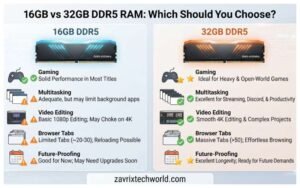
Comparison Between 16GB And 32GB DDR5 RAM
| Usage | Recommendation |
| Browsing & office work | 16GB |
| Programming | 16GB |
| Everyday multitasking | 16GB |
| Gaming | 16GB–32GB |
| Gaming + streaming | 32GB |
| Video editing | 32GB |
| Virtual machines | 32GB+ |
| Heavy professional workloads | 32GB+ |
Do not rush into choosing 32GB if 16GB fulfills your needs. However, if you are thinking about the future and can afford it, additional space will usually last you well.
What about CL36, CL40, and Latency?
CAS latency (CL) is the delay between a memory request and the data actually showing up. Lower CL is technically faster within the same speed tier, but honestly, the real-world difference is small enough that most people won’t notice it day to day. A 6000 MT/s CL36 kit is technically faster than a CL40 version, but the real-world difference is usually too small to base your buying decision on. Look at the whole picture instead: speed, timings, capacity, and whether your platform actually supports it. One number on a sticker shouldn’t make or break the choice.
What I Should Check Before Buying
Motherboard first
Nothing else matters if it doesn’t support DDR5 properly.
CPU’s supported speeds
Just as important as the board.
Skip the urge to max out speed
Pointless if your platform won’t run it cleanly anyway.
Go with a matched kit
Play it safe on a new build — one less thing that can go wrong.
Give it a pass on the RGB tax if you don’t like lights
Doesn’t add performance.
DDR5 Memory Issues
System crashes, problems while booting, or a module that doesn’t reach its clock rate post-installation does not necessarily indicate a faulty stick. Here’s what you need to do in that order:
- Make sure that the sticks are seated correctly in the proper slots recommended for DDR5 on your motherboard.
- Make sure that your motherboard’s BIOS is updated to its newest version, since there are always new updates made by manufacturers to increase the stability and compatibility of DDR5 RAM.
- Reset your motherboard settings if you have trouble getting a display after setting up XMP/EXPO.
So, Is 16GB DDR5 RAM Worth It?
For most people, yes. It’s a strong balance of capacity and cost for everyday work, programming, and a lot of gaming. Going for the maximum MT/s speed rating is generally not worthwhile, since a good 16GB RAM kit matched to your system will be much more effective than an expensive RAM set which may not be performing up to its rated speed. If you’re a multitasking gamer, streamer, or video creator, 32GB would be worth the extra expense.
FAQ’s
Is 16GB DDR5 RAM enough for gaming?
Yes, for most setups. Streamers or heavy multitasks may prefer 32GB.
Is 6000 MT/s DDR5 better than 5600 MT/s?
Depends on your CPU and motherboard. On many AMD AM5 systems, 6000 MT/s is a popular sweet spot because it offers a strong balance of bandwidth, latency, and memory-controller stability. Higher speeds can work, but results vary by CPU, motherboard, and memory kit.
Can I use DDR5 RAM in a DDR4 motherboard?
No — different pin layouts, physically incompatible.
Should I buy 1×16GB or 2×8GB?
2×8GB enables dual-channel on supported platforms — usually the better pick for a new build. 1×16GB leaves room to add a second stick later.
Is 16GB enough for programming?
Yes, for typical dev. work. Heavy VM or container users may want 32GB.
Should I buy 16GB or 32GB DDR5 RAM?
16GB for everyday use and gaming; 32GB for demanding workloads or long-term headroom.
Final Verdict
If you need to make a decision right now, 16GB DDR5 is good enough for a regular desktop computer, PC gaming station, or notebook that is used in a professional capacity, with 32GB memory only considered when you have a definite plan to work on editing videos or virtual machines. The speed rating will not matter if your motherboard and CPU cannot support it, so choose a configuration that your hardware can run reliably.
