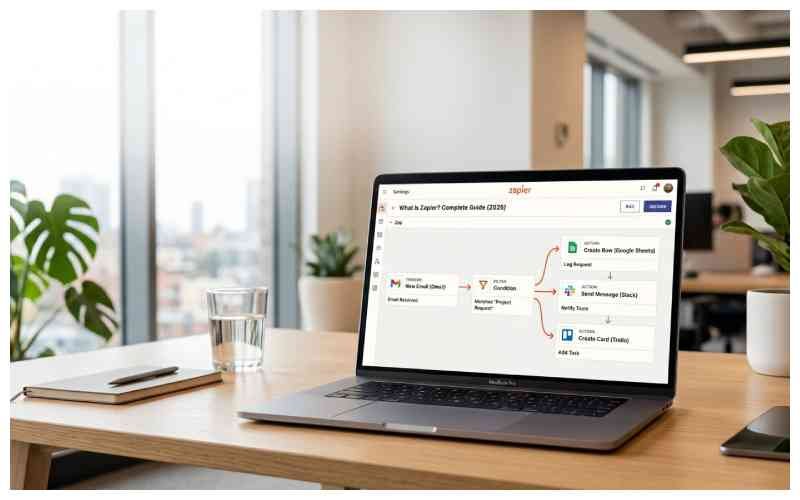
Zapier connects apps and automates repetitive tasks without requiring code. Use it for things like moving form submissions into a CRM, sending notifications, or updating spreadsheets automatically.
If you’ve ever copied information from one app into another — a signup into a spreadsheet, a form submission into your CRM — you’ve hit the problem Zapier solves. What is Zapier? A no-code automation platform that connects your apps so they hand off data to each other on their own.
What Does Zapier Do?
Zapier lets you build “Zaps” — workflows made of a trigger (something that happens in one app) and an action (something Zapier does in another app). Say a lead fills out a form: instead of someone checking it, copying details into a CRM, and messaging sales, a Zap handles all three steps instantly.
That’s what Zapier automation comes down to: letting software handle repetitive handoffs while you focus on work that needs your attention.
What Is a Zapier?
Zapier calls each automated workflow a Zap. Something happens, and Zapier carries out one or more tasks for you. Some Zaps are just one trigger feeding one action; others get more involved, with multiple steps, filters, conditional branches (“Paths”), delays, or an AI step.
How Does Zapier Work?
Pick a trigger app and event — say “new email in Gmail” — then a target app and event, like “create a task in Asana.” Zapier watches the trigger app, and the moment that event fires, it runs the action. No coding. You can also add filters, conditional logic, and AI steps that classify or summarize data along the way.
Trigger vs. Action
Every Zap comes down to two pieces:
- Trigger: the event that kicks a Zap off: a new lead, a new spreadsheet row, an inbound email. Checking for new data doesn’t cost a task — only completed actions do.
- Action: what happens once the trigger fires: a Slack message, a calendar event, a database update. Each successful action counts as a task.
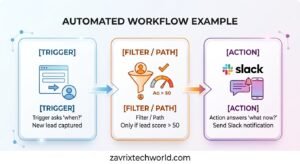
The trigger asks, “When?” The action answers, “What now?”
[Trigger] → [Filter / Path] → [Action]
New lead only if lead Send Slack
Captured score > 50 notification
Real-World Zapier Automation Examples
Say you run a small agency collecting inquiries through a Google Form. Without automation, someone checks the form, copies the client’s details into the CRM, and tells sales. A Zap does all three the moment the form is submitted.
- Sales: Deal marked “won” → create an invoice, notify the account manager on Slack.
- Marketing: Lead form filled → add to email list, log into a Google Sheet.
- Support: New Zen desk ticket → tag it, assign it, and post a summary in Teams.
- Operations: File uploaded to Drop box/Drive → back it up, rename it, and trigger approval.
- AI-Enhanced: Customer email arrives → AI step classifies intent and routes it.
Step-by-Step Zapier Tutorial 2026: Building Your First Zap
Example: send a Slack alert whenever a new lead fills out a Google Form.
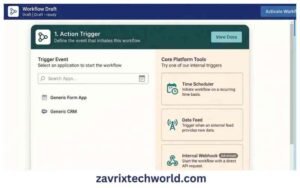
- Create a new Zap to open the visual builder.
- Choose your trigger: “Google Forms” → “New Form Response,” then connect your account.
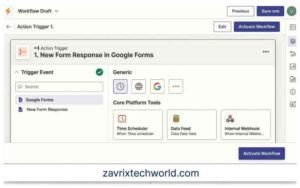
- Test the trigger to confirm it reads the right fields.
- Add a filter (optional) — for example, continue only if “Interest Level” is “High.” Filters don’t count toward task usage.
- Choose your action: “Slack” → “Send Channel Message,” then connect to your workspace.
- Map your fields — e.g., “New lead: {{Name}} ({{Email}}) — Interest: {{Interest Level}}.”
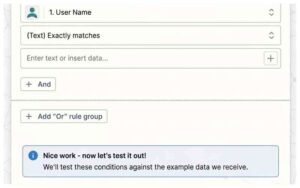
- Test the full Zap end-to-end.
- Turn it on — every new form response now triggers a Slack message automatically.
For polling-based triggers, Zapier checks for new data every 15 minutes on Free, 2 minutes on Professional, and 1 minute on Team and Enterprise by default. Instant triggers can work differently. Over dozens of leads a week that saved manual checking adds up.
Tip: swap the bracketed placeholders for real screenshots of your own Zap — that turns a how-to into a genuine case study.
Zapier Integrations
Zapier integrations cover more than 9,000 apps — Google Workspace, Salesforce, HubSpot, Slack, Microsoft Teams, ChatGPT, and more. In practice, people use that library for whatever repetitive task they want off their plate: lead management, sales pipelines, ticket routing, and marketing campaigns. When evaluating unfamiliar software, it’s also worth checking whether the product is actually available, supported, and actively maintained before building an automation around it.
Who Is Zapier For?
Zapier fits very different kinds of work — a freelancer moving client inquiries into a CRM, a marketing team passing leads between forms, email, and sales tools, or a larger company setting up shared workflows and admin controls.
- Solopreneurs and freelancers automating onboarding or invoicing without hiring a developer
- Marketing and sales teams connecting forms, email tools, and CRMs
- Enterprises needing shared workflows, admin controls, and security features (SSO, SCIM, audit logs)
Is Zapier Free?
Is Zapier free? Yes — the Zapier free plan includes two-step Zaps, the visual editor, templates, and a monthly task allowance. Enough to test the platform before paying.
Zapier Pricing Breakdown (2026)
Zapier pricing is tiered and task-based:
| Plan | Price | Best For |
| Free | $0/month | Testing basic automations |
| Professional | Starting from $19.99/month | Solopreneurs and power users needing multi-step Zaps |
| Team | Starting from $69/month | Teams needing shared workspaces and SAML SSO |
| Enterprise | Custom | Large organizations needing advanced security and governance |
Higher tiers add multi-step Zaps, unlimited premium apps, webhooks, and AI fields; Team and Enterprise add shared Zaps, connections, and priority support. Cost scales with monthly task volume.
What Are Zapier Tasks?
A task is used every time a Zap completes an action successfully — e.g., creating a CRM contact.
- Triggers and polling don’t cost tasks — only completed actions do.
- Multi-step Zaps use one task per successful action.
- Filters, Paths, and Formatter don’t count toward task usage. Some other built-in tools also don’t consume tasks, depending on the workflow.
- You’re emailed as you approach and hit your limit, and then can opt into pay-per-task billing or upgrade.
- AI and code steps can use more tasks depending on complexity.
The task tier is really the main decision when picking a plan — features stay similar; volume is what changes.
What Happens When a Zap Fails?
- Automations sometimes fail — an API times out, an account loses authorization, or an app changes its data format.
- Error notifications emailed automatically on failure.
- Auto-replay automatically retries a failed step (paid plans).
- Customized error settings, e.g., pause a Zap after repeated failures.
- Flood protection stops a Zap from flooding a connected app.
- Zap history and versions review past runs, roll back if needed.
Worth testing how a Zap behaves under failure before it fails in production.
Zapier AI
Zapier AI is a growing part of the platform: AI-powered steps that classify text, extract data, summarize content, and generate responses inside a workflow. Add Zapier Agents (AI teammates that act across your apps), Zapier Chatbots, and Zapier MCP (lets AI apps take action across the 9,000-app ecosystem), and Zapier is turning into something closer to an AI orchestration layer.
Zapier Alternatives
If Zapier isn’t the right fit, look at Make (formerly Integromat), n8n, or Activepieces.They differ on pricing, builder style, and self-hosting — the right pick depends on budget, technical comfort, and workflow complexity.
Zapier vs Make vs n8n: Quick Comparison
| Tool | Ease of Use | Customizability | Price |
| Zapier | Visual builder, no coding required | Strong built-in logic; less flexible than code-first tools | Higher at scale, task-based billing |
| Make | Visual but more technical (node-based canvas) | Granular control over data flow | Generally cheaper per operation than Zapier |
| n8n | Steeper learning curve, closer to a dev. Tool | Open-source, self-hostable, full code access | Free if self-hosted; cloud plans also available |
In short: Zapier for speed and simplicity, Make for a balance of visual building and deeper control, n8n for maximum customization or self-hosting.
Security & Compliance
apier maintains SOC 2 Type II and SOC 3 certifications and provides GDPR and CCPA compliance measures. Data is encrypted with AES-256 at rest and TLS 1.2+ in transit. Data is encrypted with AES-256 at rest and TLS in transit; Enterprise plans add SSO, SCIM, audit logs, and custom data retention.
One caveat: Zapier is not HIPAA-compliant and won’t sign a Business Associate Agreement (BAA), so it shouldn’t handle protected health information (PHI). Solid for standard business, marketing, sales, and support workflows — just not healthcare data under HIPAA.
Pros and Cons of Zapier
Pros
- Large selection of app integrations
- No-code workflow builder
- Free plan for basic automation
- Enterprise administration and security features
Cons
- Usage-based pricing can become expensive at higher volumes
- Some features require paid plans
- Complex workflows can become harder to manage
Frequently Asked Questions
Is Zapier safe to connect to my business email?
Yes. AES-256 encryption, TLS in transit, SOC 2 Type II/SOC 3 certification, and two-factor authentication plus SSO on higher plans. Just avoid connecting protected health information — Zapier isn’t HIPAA-compliant.
Do I need coding skills to use Zapier?
No. It’s a visual, no-code workflow builder — you select the apps and events to connect. Developers can also use Code steps and the SDK for more control.
How much does Zapier cost for a small business?
Most land on the Professional plan, starting at $19.99/month for 750 tasks, depending on monthly usage.
Can Zapier connect to AI tools like ChatGPT?
Yes — it integrates with ChatGPT and other AI tools, and has native AI features: Agents, Chatbots, AI Actions, and Zapier MCP.
What happens if I exceed my monthly task limit?
You’re emailed as you approach and hit the limit. From there, upgrade or turn on pay-per-task billing; otherwise zaps pause until the next billing cycle.
Final Thoughts
To circle back: what is Zapier actually good for? Mostly the small, repetitive handoffs between apps that eat up time without needing much judgment — moving a lead into a CRM, alerting a teammate, or logging a form response. It won’t replace real decision-making work, but it removes a lot of the manual grind. Whether you’re testing the free plan solo or running AI-powered workflows across a team, that’s the value: fewer copy-paste steps, fewer things falling through the cracks.
